Current-word highlight
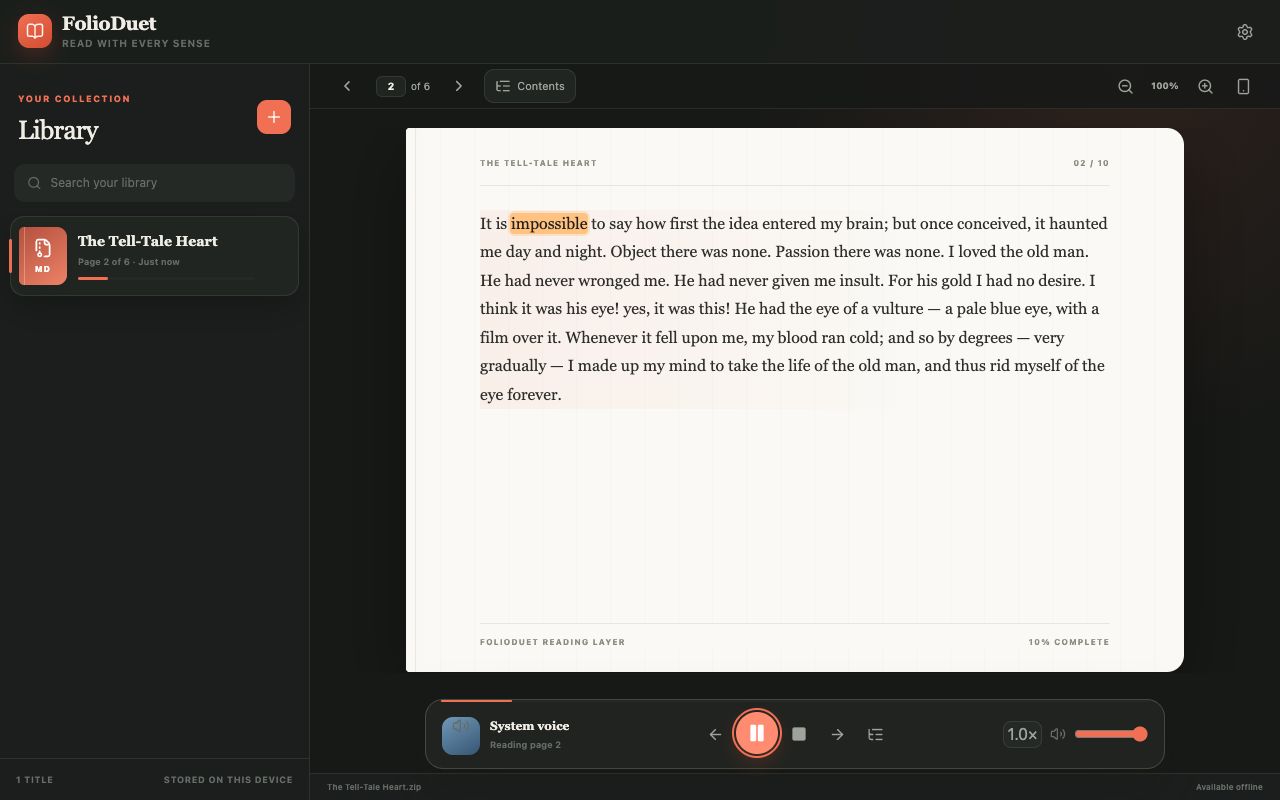
Speech timing updates the active word so you can follow the line instead of hunting for your place.
 FolioDuet
Read with every sense
PDF audiobook-style reader
FolioDuet
Read with every sense
PDF audiobook-style reader
Synchronized PDF read-along
Hear the words. See your place. FolioDuet reads your PDF aloud while highlighting the current word, so your eyes and ears stay on the same line.
Your original PDF stays on this device. Extracted text can sync after sign-in, and neural speech sends the narrated passage to the selected TTS provider. Read the privacy details
Visual transcript: The library and open book appear together. The current page is centered like a sheet of paper; “impossible” is highlighted in amber during narration, with page number and overall reading progress still visible.
One synchronized surface
The voice, visible text, and your saved place move as parts of the same reader.
Speech timing updates the active word so you can follow the line instead of hunting for your place.
Pause, resume, choose a starting word, and cycle between playback speeds from 0.8× to 2×.
Narration continues through readable blocks, updates the page, and remembers where you stopped.
Who it may suit
Reading and listening together is sometimes called bimodal reading. FolioDuet provides the mechanics without making medical or comprehension guarantees.
Less window juggling
A standalone PDF window can show the page, and a separate audio player can carry the sound. FolioDuet connects those two states: the word you hear is also the place you see.
You can tap a word in the reading layer to begin there, then keep the playback controls, page movement, and progress together.
Start in the browser
Before you begin
Your files are not all treated the same: the original PDF remains on the import device. A signed-in library can sync extracted text and progress. Neural TTS processes only the text selected for speech through the configured provider. Consent-gated analytics can be declined without disabling the reader.
Frequently asked questions
The active-word highlight updates from timing supplied by the speech engine. Neural providers with alignment data offer the intended synchronized experience; timing precision can vary when playback falls back to a browser system voice.
Yes. Words in the FolioDuet reading layer are selectable playback starting points.
Playback advances through readable text blocks and updates the current reader page. A page without usable extracted text may have nothing to narrate.
Yes. The reader includes speech-provider and voice settings, plus 0.8×, 1×, 1.2×, 1.5×, and 2× playback. Available voices depend on the provider or browser.
FolioDuet has responsive phone and desktop layouts. Provider and browser voice support can differ between devices, so the exact set of voices is not universal.
Not by itself. The PDF needs a usable text layer; FolioDuet does not currently promise built-in OCR for image-only scans.
Another way to describe it
The same continuous reader can help you listen to a PDF like an audiobook, while keeping the current page available whenever you look back at the screen.
FolioDuet is open source under the MIT License. The source and issue tracker are available on GitHub.
Start with one page